Tracking Performance
Objectives let a coach tag exactly what a surfer is working on — a cutback, a barrel entry, wave selection — and see how they actually performed on it, session after session.
What an objective is
An objective is just a name — "Cutbacks", "Barrel positioning", whatever you're coaching that day. You create it once from the Objectives page, and it becomes part of your own reusable list, shared across every training you run. There's no target number or metric to configure — it's a tag, not a scoreboard.
Set live, per surfer, per session
During a running session, the Objective button on a surfer's panel opens a quick search-or-create list. Pick one or more objectives for that surfer, and every wave they catch from then on is tagged with it automatically — until you change the selection again. No setup screen before the session, no going back afterward to tag waves by hand.
Technical sessions and competition heats alike
Objectives aren't limited to competition heats — the same button is available whichever training type you're running, so a purely technical session focused on one skill gets the same tagging and filtering as a full scored heat.
See it in the session statistics
Filter a training's statistics by an objective and everything narrows down to just the heats and waves tagged with it: average score, best score, heats won, and the surfer's top waves for that skill. Come back to the same filtered view in the next session to see whether it's trending up.
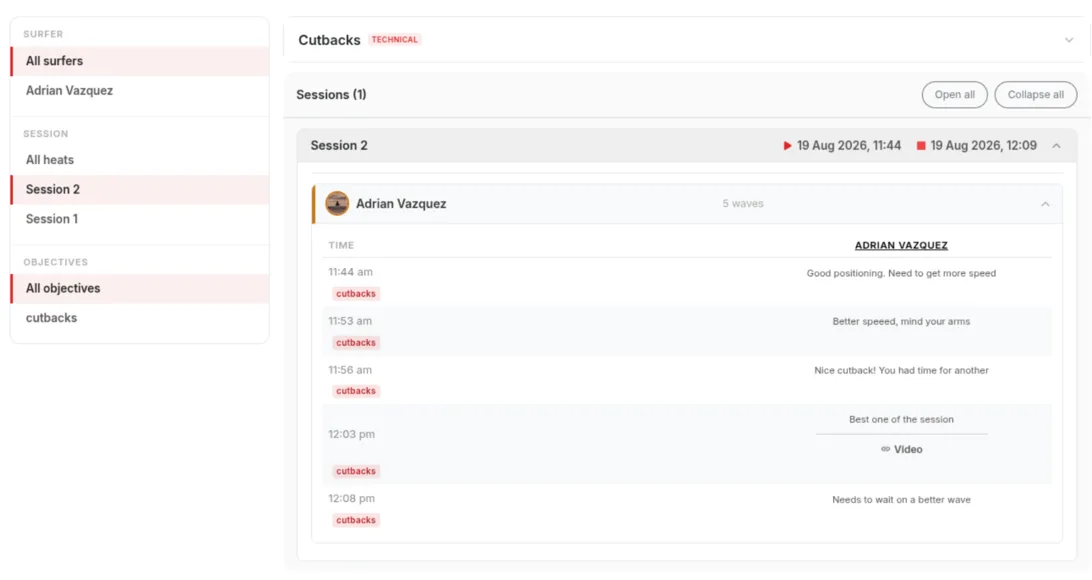
Nothing to configure ahead of time
Type to search your existing objectives or create a new one on the spot — there's no limit on how many you keep. Deleting one just stops it showing up as a filter going forward; the waves and heats already tagged with it keep their history.
Getting started
- Add an objective from the Objectives page, or create one inline the first time you need it.
- During a session, open a surfer's panel and tap Objective to select what they're working on.
- Score waves as normal — each one is tagged automatically while that objective is selected.
- Open the training's statistics and filter by the objective to see how it went.
Frequently asked questions
Do I need to set up objectives before a session?
No. You can create one from the Objectives page ahead of time, or type a new name straight into the search box during the session — it's added and selected in one step.
Can I use objectives outside of competition heats?
Yes. The Objective button works the same way in technical training sessions as it does in competition heats.
Is there a limit to how many objectives I can create?
No — your objective list is personal to your coaching account and shared across all your trainings, with no cap on how many you add.
What happens if I delete an objective?
It's removed from your list and stops being available as a filter, but waves and heats already tagged with it keep that history — deleting doesn't rewrite past sessions.
Do objectives affect scoring?
No. They're a tag on the wave, not part of the score itself — total, tiebreakers and the "needs" figure are unaffected.
Tag your next session
Create a free account, set an objective for a surfer, and see it show up in that training's statistics.
Related
All Features How Are Surf Heats Scored?